


Webflow Security
When comparing Webflow and WordPress security, it comes down to a fundamental architectural difference.
WordPress is an open-source, self-hosted system where the burden of security falls entirely on you and your hosting provider. Webflow is a closed SaaS (Software as a Service) platform where security is baked into the core infrastructure and managed globally by an enterprise engineering team.
According to various security reports, WordPress accounts for roughly 90% of all hacked CMS platforms—not because the core WordPress code is inherently evil, but because its architecture leaves the door wide open to human error, neglected maintenance, and third-party exploits.
Here is exactly how and why Webflow holds a massive security advantage over WordPress.
The Attack Surface: Static Delivery vs Live Databases
The "attack surface" is the total number of entry points a hacker can exploit to compromise a website. Webflow significantly shrinks this footprint.
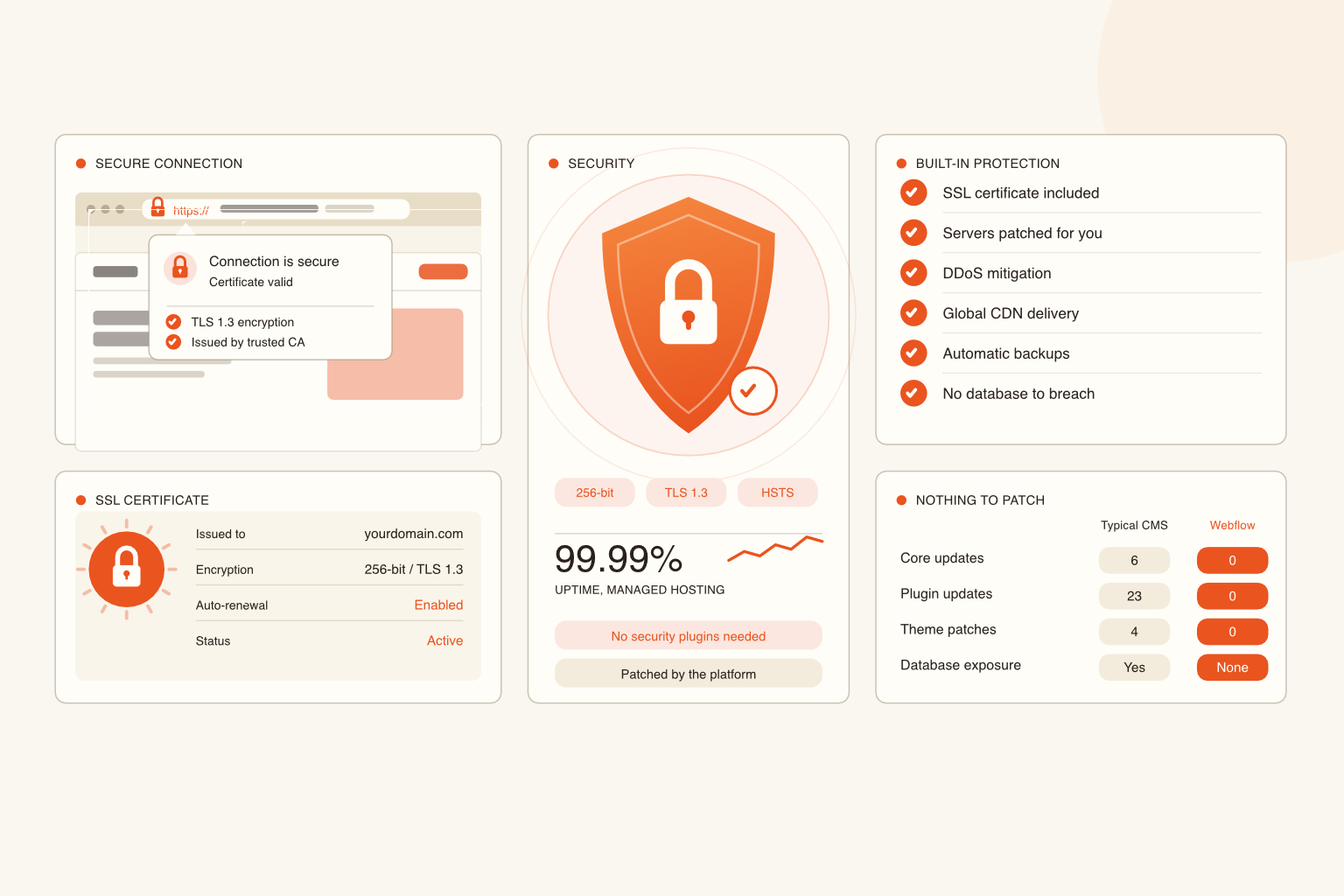
- Webflow’s Static Generation: When you hit publish in Webflow, the platform compiles your design into static, clean HTML, CSS, and JavaScript. These files are pushed directly to global Content Delivery Networks (CDNs) like AWS, Cloudflare, and Fastly. Because the public-facing site doesn't rely on a live server-side database to load a page, there is no database for hackers to breach, so SQL injection attacks are virtually impossible.
- WordPress’s Dynamic Execution: Every time a visitor lands on a WordPress site, the server runs PHP code to query a MySQL database and assemble the page on the fly. This active execution layer means there is a constant, live connection to a database that hackers can target via malicious inputs, cross-site scripting (XSS), or brute-force login attempts.
The Plugin Problem (Supply Chain Attacks)
To get a WordPress site to perform at an agency level, you usually have to stack 15 to 30 third-party plugins for SEO, forms, caching, and backups.
- The WordPress Risk: Security research consistently shows that over 55% of WordPress vulnerabilities originate from third-party plugins. If a plugin developer abandons their project, or if a hacker buys a popular plugin and injects malicious code into an update (a supply chain attack), your site becomes instantly vulnerable.
- The Webflow Solution: Webflow doesn't use plugins to achieve core functionality. SEO, custom forms, responsive imaging, and the CMS are all native features built and secured by Webflow’s internal team. No third-party code means no backdoor entry points for attackers.
Maintenance Overhead & The "Fear of Updating"
Keeping a website secure requires constant patching. How the two platforms handle this couldn't be more different.
- WordPress Patching: WordPress requires frequent updates for its core files, themes, and every single plugin. Because updates can often conflict and break the site's layout, users frequently defer them. Leaving plugins outdated for months creates a ticking security time bomb.
- Webflow Auto-Updates: Webflow handles all platform updates, security patches, and server maintenance globally behind the scenes. You are always on the latest, most secure version of the software without ever having to click "Update" or worry about a patch crashing your client's live site.
Hosting & Infrastructure Compliance
With WordPress, your security is only as good as the cheap shared hosting plan or the complex VPS setup you choose. Webflow standardises enterprise-grade hosting for everyone.
- Built-in SSL & DDoS Protection: Every Webflow site automatically includes SSL/TLS encryption by default and features built-in, highly scaled DDoS mitigation via AWS Shield and Cloudflare.
- Global Security Certifications: Webflow undergoes rigorous independent auditing and carries industry-standard compliance certifications out of the box, including SOC 2 Type II, ISO 27001, and ISO 27017 (Cloud Security). Achieving this level of institutional security on a self-hosted WordPress site would require thousands of dollars in annual software, specialised hosting setups, and dedicated IT compliance experts.
The Bottom Line
Securing a WordPress site requires active, relentless vigilance, firewalls, and security plugins like Wordfence or Sucuri. Webflow is secure by design, shifting the security burden off the developers' shoulders and ensuring clients don't have to worry about their digital storefront getting defaced overnight.
Pennine Website Design & Development is a freelance web design and development service based in Barnard Castle, Teesdale. We build bespoke, high-performance websites for businesses and non-profits across the North East.
Get in touch | View our work | See pricing
Jamie McBain